
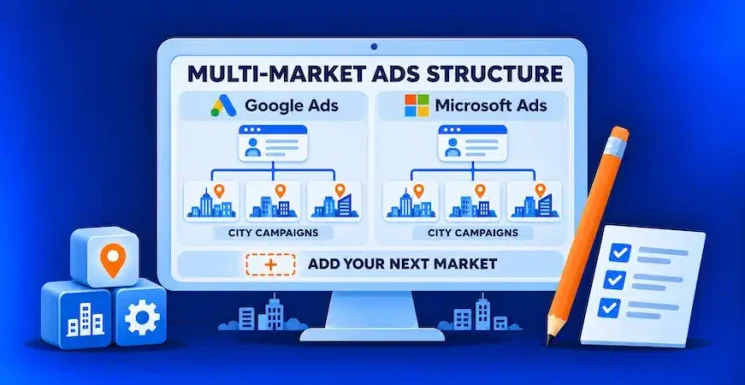
For a $5–10M MSP, a practical starting point is one Google Ads account and one Microsoft Advertising account, with separate campaigns for markets that need independent budgets or messaging. Set geography in each campaign, track qualified leads consistently, and use a reviewed campaign template when a client brings you into another city.
That structure matters when expansion follows an existing client. Your home market may have years of reviews and referrals behind it, while a second market will most likely start with one account and limited local proof. A new market should not automatically compete for the same advertising budget.
The goal is a multi-location Google Ads account structure that gives you control without multiplying campaigns beyond what your team, budget, and lead volume can support. Apply the same organizing logic to Microsoft, then check its settings separately.
1. Use one account per platform, with campaigns built around decisions
A new city usually does not need a new advertising account. Keeping the same brand’s markets together simplifies access, tracking administration, and reporting. Separate accounts can make sense when brands, billing arrangements, ownership, or operational responsibilities genuinely differ.
Within each account, create separate campaigns when you need to control a market’s budget, offer, geography, or launch schedule independently.
| Account layer | Recommended role | MSP example |
|---|---|---|
| Account | Manage the brand’s advertising on one platform | One Google account; one Microsoft account |
| Campaign | Control budget, geography, and bidding | A dedicated Stamford, CT acquisition test |
| Ad group | Organize closely related searches and ads | Managed IT support within that campaign |
| Landing page | Explain the relevant service and local delivery | Stamford coverage, support arrangements, and proof |
Avoid automatically creating a campaign for every city, service, and keyword variation. If two neighboring areas share the same offer, delivery model, and budget priority, grouping them may be more practical. Separate them when there is a meaningful business decision to make.
For example, keep a new Stamford, CT test separate from an established New York City campaign if you need to protect its allocation and assess its results independently. You do not necessarily need separate campaigns for every town within Fairfield County.
Use consistent names such as “Search | Stamford | Managed IT.” Keep brand searches distinguishable from acquisition campaigns so existing demand does not obscure how well you are attracting new prospects.
2. Separate audience geography from business addresses
Three settings that sound similar do different jobs:
- Campaign location targeting defines the areas where you want to reach searchers.
- Google Ads location groups organize business locations for location assets and their associations.
- Google Business Profile business groups help teams manage profiles and access.
Connecting a Business Profile does not replace configuring a Search campaign’s geographic audience. Likewise, serving a client in Boston does not by itself make your MSP eligible for a new Boston Business Profile. Only add a profile when the business location meets Google’s requirements.
Define the service area before choosing a radius. Consider onsite response commitments, travel time, remote support boundaries, and any local delivery partners. A fixed 15–20-mile radius is not a universal rule, especially across markets with different traffic patterns and business density.
For locally delivered MSP Search campaigns, start by considering Google’s Presence option: people in or regularly in the targeted locations. Google’s broader default can also include people who have shown interest in them. Review the location options deliberately.
There is a relevant exception for this series: a New York IT director may be searching for support for a Bethesda, MD branch. If those buyers matter, plan and measure that reach separately instead of assuming every out-of-market search is irrelevant.
Use exclusions where campaign boundaries actually overlap. Check supported city or postal-code exclusions and avoid excluding a larger area that contains a location you still want to reach. Microsoft does not support radius exclusions, so a blanket instruction to exclude every new market’s radius will not work across both platforms.
Location targeting is imperfect. Confirm the prospective client’s actual service address during qualification, rather than treating the click’s reported location as definitive.
3. Control market investment with budgets and qualified-lead reporting
Use campaign budgets to put your multi-market MSP budget allocation into practice.
A single account does not require a shared budget. Give a new market its own campaign budget when you need to isolate its spending. Shared budgets are an option when participating campaigns can draw flexibly from the same pool; that flexibility may conflict with protecting a limited expansion test.
Do not rely on location bid adjustments to enforce allocations. Google’s bid-adjustment documentation shows that manual location adjustments are not supported by Smart Bidding strategies such as Maximize conversions or Target CPA. A location adjustment is not a spending cap even where it is supported.
Also distinguish an average daily budget from a hard daily limit. For most Google campaigns, spending can reach twice the average daily budget on a given day, subject to applicable spending limits. Check monthly pacing and configure Microsoft’s budget separately.
Measure both platforms against the same business outcomes: qualified opportunities, sales progress, and acquired recurring revenue. Keep calls and form submissions visible, but distinguish them from leads that fit your service area, company-size requirements, and contract model.
Where practical, feed qualified outcomes back into bidding. Test Google conversion tracking and Microsoft’s Universal Event Tracking and conversion goals separately, and deduplicate opportunities in your CRM before combining platform reports.
If an expansion campaign attracts relevant visitors but few qualified conversations, investigate the offer and landing page. The local trust gap for MSPs can limit results even when targeting is configured correctly.
4. Launch each new market from a reviewed, paused template
Build a reusable Search campaign template, then keep each copy paused until its local settings pass review. Pair the setup with your 90-day client-driven expansion playbook so advertising follows delivery readiness and local proof.
Before launch, work through this checklist:
- Confirm the market brief. Record supported services, geography, delivery commitments, buyer profile, owner, test budget, and review date.
- Set the campaign controls. Check included and excluded locations, location intent, budget, bidding strategy, conversion goals, and schedule.
- Review keywords and negatives. Reuse relevant themes, but remove inherited restrictions that block useful searches. Reserve account-wide exclusions for terms that are irrelevant everywhere.
- Match the destination to the promise. Use a page explaining coverage, response arrangements, relevant experience, and a clear next step. Check that ads and location assets do not suggest an office you do not have.
- Validate measurement. Test forms, calls, tracking parameters, and CRM routing. Make sure the team can identify both the acquisition campaign and the requested service location.
- Check Microsoft after import. Importing Google campaigns can save setup work, but review geography, budgets, bidding, ads, negatives, and conversion tracking in the destination account. Check scheduled imports so later updates do not undo deliberate Microsoft settings.
Google broad-match negatives become phrase-match negatives when imported into Microsoft, so review their coverage rather than assuming identical filtering.
After launch, review search terms, spend, qualified opportunities, and service locations weekly. Use those findings to adjust the test. A low-volume market may need more time to produce a useful signal; neither a quiet first week nor a few form fills proves that it deserves expansion.
Pronto’s Google Ads management and Microsoft Ads management services can support the platform setup. If your next market is already taking shape, our MSP marketing team can help connect campaign structure, local proof, and budget decisions before you launch.