

When it comes to running your online business, getting paid is probably at the top of your priority list. Choosing between Stripe and PayPal as your payment processor can be challenging. Fortunately, understanding the nuances between them can go a long way toward helping you find your best fit.
In this article, we’ll discuss why it’s so important to choose the ideal payment processor. Then we’ll introduce you to Stripe and PayPal, and examine ten essential differences between them. Let’s dive right in!
The Importance of Choosing the Right Payment Processor for Your Business
Cash flow is critical to most companies, but everyone handles their financials a little differently. For example, you might do a lot of international business that requires you to keep an eye on currency-related fees. Alternatively, you may want the freedom to transfer funds between accounts as quickly as possible.
Each payment processor offers different features. Variations such as accepted payment types, presence in certain countries, and advanced billing options all have the potential to impact your business. Technological distinctions like payment hosting are also issues you might want to consider.
Obviously, there is no one-size-fits-all answer to the simple question: “Is Stripe better than PayPal?” Both companies provide competitive services that differ in meaningful ways. If you want to choose the best payment processor, we recommend examining how each would support your business’s unique needs.
An Introduction to Stripe and PayPal
Stripe and PayPal are comparable, competitive companies. They both offer payment processing services to anyone who needs them, including:
- Organizations selling digital or physical goods
- Online communities selling memberships
- Nonprofit organizations accepting donations
Both platforms are also widely used in the world of WordPress.
While both payment processors are beginner-friendly, you might want to consider using a managed eCommerce store if you’re uncomfortable with the process of setting them up. This service handles the technical details of configuring a new payment gateway, saving you time so you can focus on the rest of your business.
An Overview of Stripe
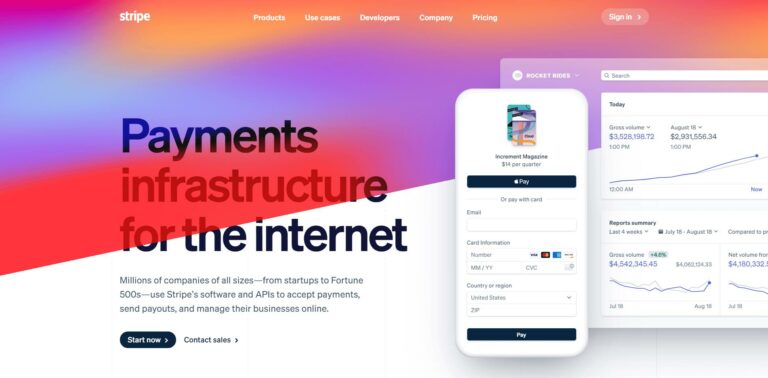
Stripe offers financial software that comes with an API specifically designed for eCommerce. In simpler terms, it’s a platform with many features for people interested in customizing code. However, you can also use it without touching any of the more developer-centric features.
In addition to helping money change hands, Stripe also provides users with anti-fraud tools to secure the transaction process. The company also recently introduced an option to accept payments with physical readers. Some prominent customers of this company include Lyft, Postmates, and Booking.com.
An Overview of PayPal
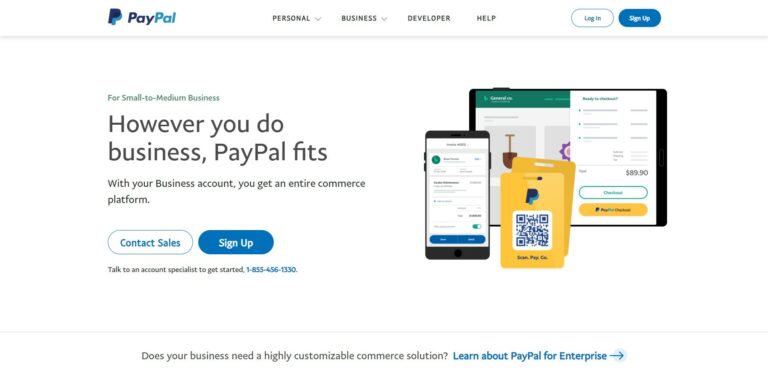
PayPal is a little different than Stripe. Its software is geared less toward developers and has fewer technical features. This payment processor also offers personal accounts for individuals, whereas Stripe is exclusively for companies. Nevertheless, PayPal also provides a variety of eCommerce solutions, such as a digital wallet.
PayPal has also been around about 12 years longer than Stripe, making it a more well-known and established option. Some of its most famous corporate users include Hulu, The Red Cross, and FEMA.
Stripe vs. PayPal: 10 Questions
to decide which is better for your online sales
If you still find yourself asking, “Is Stripe better than PayPal?”, you’re not alone. We’ve researched ten critical areas to help you answer that question. Consider comparing the following aspects before committing to a service.
1. Which gateway has lower fees, Stripe or PayPal?
Let’s start with arguably the most important matter: fees. Any payment processor worth using will charge you in some way for its services. It’s the price of doing business. However, not all fees are the same.
Stripe charges a fee of 2.90% + 0.30 USD for all standard payments. In this case, “standard payments” refers to any successful charge on a card or digital wallet in your organization’s native country and currency.
An international card will add an extra 1%, as will any currency conversions. If you want to accept large payments via Automated Clearing House (ACH) direct debit instead, the fee will be 0.8% of the total with a cap of $5.00. Stripe also offers custom pricing for large or unconventional companies.
PayPal charges a fee of 2.90% + 0.30 USD/CAD for standard online transactions. It adds a 1.50% fee to any international transaction. Charities are eligible for lower rates, with various other charges applied to things such as micropayments, QR Codes, and PayPal Here options.
For what’s likely the bulk of your transactions, Stripe and PayPal offer nearly identical fees.
You might want to look at the fine print if you have any special cases, such as high volumes of international transactions. Otherwise, both platforms are relatively equal.
2. Between Stripe and PayPal, which gateway has the fastest payouts?
A lot of businesses rely on quick and easy access to their profits. If you count your organization as one of them, there are a few differences between Stripe and PayPal worth noting.
Stripe has a bit of a slow start for payouts. You need to establish your account to gain access to your first payment, which can take up to 14 days. After that, your payouts will need to follow your unique payout schedule.
Stripe determines the schedule. Both your country and the relative risk of your industry contribute to this decision. Standard, low-risk industries in the U.S. can expect a payout timing of 2 business days.
PayPal, by contrast, offers a quicker solution. It provides free local transfers to bank accounts in 1-3 days. If you need the money immediately, you can choose to pay a 1% fee for an instant bank or card transfer.
The difference here is fairly significant. PayPal’s payout system is simpler and comes with a paid option to speed the process up, while Stripe can be more unpredictable.
Essentially, if you’re wondering whether Stripe is better than PayPal when it comes to payouts, we’d say “not really”. However, payouts don’t necessarily need to be a deciding factor for either platform. It all comes down to the degree of financial control you want for your business.
3. What types of payments do Stripe and PayPal accept?
Global charge methods are far from universal. Depending on your audience, your customers may have access to different methods of payment. Increasing your accepted options might help to drive more purchases.
Before we compare Stripe vs PayPal, let’s define a term you’ve probably heard countless times: ‘major credit cards’. This phrase generally refers to the four largest card networks: Visa, Mastercard, American Express, and Discover.
Wherever you see organizations refer to major credit cards, you can reasonably expect that they mean these four. However, most companies will also spell out exactly which cards they’re talking about, especially if they differ from the popular definition.
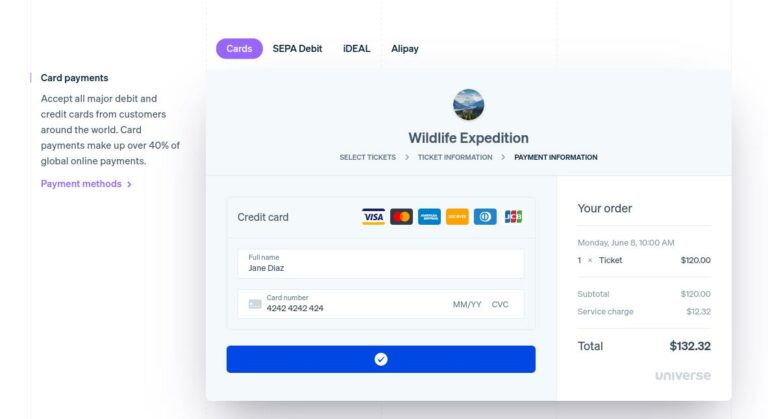
When it comes to accepted payment types, Stripe offers several options, including:
- All major debit and credit cards
- Digital wallets
- Bank transfers
- Bank redirects
- “Buy now, pay later” services
Furthermore, the platform also offers the ability to pay for online purchases at a physical location with cash:
You may find PayPal’s options a bit more limited by comparison. PayPal accepts:
- Most major credit cards
- Debit cards that don’t require a pin
- Direct bank transfers
- Other PayPal accounts
- Cards from the PayPal vault
Ultimately, both Stripe and PayPal accept a wide variety of payment types. The most significant difference is that PayPal seems to prefer keeping cash within its own ecosystem. Depending on your customers, this practice might restrict potential purchases.
4. Is Stripe or PayPal more user friendly?
Our second to last consideration comes from a human angle: user-friendliness. Even if you’re a tech whiz, you don’t want things to be more complicated than necessary. Understanding and using your financial technology with ease is vital.
Like we said at the start, Stripe specifically gears its platform toward developers who typically have an in-depth knowledge of code. As such, you’ll probably want to have a fair degree of developer knowledge if you’re using Stripe. Otherwise, there might be a harsh learning curve.
PayPal lands at the opposite end of the spectrum. Generally, it’s a very user-friendly platform. The interface is well-labeled, and there’s no overly technical knowledge required to operate it. Because of this, PayPal is accessible to almost any user.
5. What invoicing features do Stripe and PayPal offer?
Depending on your industry, you may not always be asking for straightforward one-time charges from customers. For example, maybe you offer subscriptions or recurring payment options. You might also use invoices. Each of these avenues can play an essential role in your sales funnel.
Stripe has a Starter plan that allows for recurring payments at a 0.5% fee. Alternatively, you could choose the Scale plan for a slightly higher 0.8% fee. If you’re looking for more integrations and features with the ability to customize, the Scale plan offers benefits in that area.
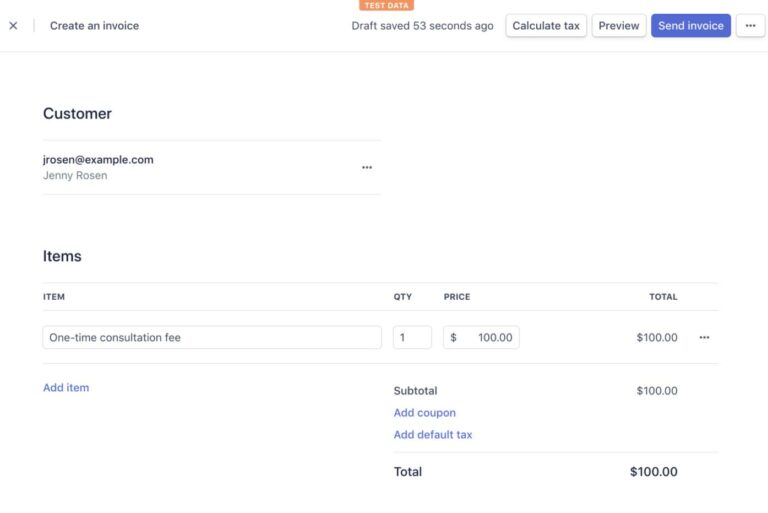
Stripe-created invoices are simple and streamlined. Here’s a sample of what one might look like:
As for PayPal, there’s a separate set-up process for recurring billing items. You can choose from fixed or quantity pricing. This type of advanced billing can be added to the Express Checkout plan for free, or customized further with the PayPal Payments Pro plan at $30 per month.
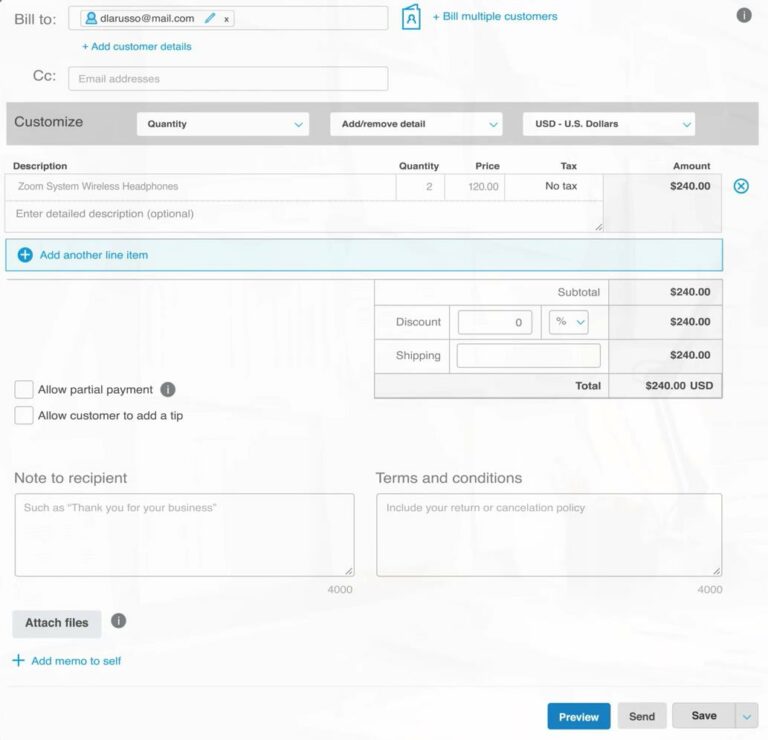
PayPal invoices offer you the flexibility to add more detail. Here’s an example from PayPal’s interface:
If you’re trying to decide between Stripe and PayPal for advanced billing, the best option will depend on how many recurring charges and invoices you create each month. If the answer is “plenty”, PayPal might offer more value. However, Stripe could be a wise choice if you have less expensive or frequent complex charges.
6. How do Stripe and PayPal compare in terms of security and compliance?
WordPress is an exceptionally secure website platform. With that being said, no system is perfect. In addition to maintaining all-around site security, you might want to consider your payment processor’s security and PCI compliance.
PCI compliance refers to best practices that apply to any organization handling credit card information. Financial transactions become safer when a company maintains these standards.
Both Stripe and PayPal are fully compliant, but with some subtle differences. Stripe is compliant with no effort necessary on your end – no work, no fees, and total security. It’s that simple.
PayPal, while also in line with all security measures, might require some adjustments on your end. Hosting payments on your site means that you’ll have to manage your own PCI compliance. However, you can use the Transparent Redirect feature to skip this by using PayPal’s server instead.
Ultimately, both options are incredibly secure. If you choose PayPal Payments Pro, you might want to consider taking advantage of its redirect features.
7. Which currencies do Stripe and PayPal allow?
If you plan on doing business internationally, how your payment processor handles countries and currencies may be critical. International purchases come with some vocabulary that can be confusing, so let’s start by clearing that up.
A ‘presentment currency’ refers to what the customer is paying in. A ‘settlement currency’ is what your chosen bank will ultimately accept from the charge. Fees can potentially apply to either of these, so you might want to take notice.
Stripe currently accepts over 135 currencies. As a business, you’ll have the option to route certain currencies to specific bank accounts to avoid the need to convert. Alternatively, Stripe can also accept all payments to a single bank account for a 1% conversion fee.
On the other hand, PayPal currently supports over 100 currencies. When you receive a foreign payment, you can choose to either convert it to USD for a 1.50% fee or hold it as-is in your PayPal account. The money will remain there until you’re ready to use or convert it.
So, when it comes to international exchanges, is Stripe better than PayPal? The answer depends on what you need.
If you’re looking for a lot of options and lower fees, Stripe wins in this category. However, if you want to prioritize simplicity, you might favor PayPal’s international process instead.
8. Which payment gateway has more third-party integrations, Stripe or PayPal?
Third-party integrations can refer to any technology made by an outside organization to add functionality to your site. If you’re looking to incorporate specific eCommerce features, you might want to choose a payment processor that gives you the freedom to do so.
Stripe is a powerhouse in this area, offering a huge number of integrations. The platform provides entire categories of third-party help in the form of subscriptions, customer communications, and shipping – just to name a few. The possibilities seem endless.
PayPal has fewer options, but still has a wide variety to choose from. The company focuses on integrations with popular vendors, such as WooCommerce, Shopify, and GoDaddy.
At the end of the day, PayPal covers the basics of third-party partnerships, which may be all you need. However, if you’re interested in developing a custom integration system, you might want to use Stripe.
If you’re feeling a bit lost in terms of what technology your store needs or how to implement it, you’re not alone. Integrations can be helpful but also confusing to configure. Using a website design service in this situation might give you the guidance you need.
9. How are Stripe and PayPal gateways hosted?
When we use “hosting” in the context of eCommerce, we’re referring to the location where payments are processed. While this might not seem that noteworthy at first, your choice of how you accept customer cash can have a real impact on visitors’ checkout experiences.
Stripe offers a single option in this regard: all users must use a checkout process that’s hosted on your site. There’s no option to redirect to a different page. However, you can still customize the aesthetics of the experience, especially if you’re comfortable working with code.
By contrast, PayPal has a broader range of checkouts to choose from. The first is redirecting customers to PayPal’s site. While this removes your site from the equation, it might also encourage trust from users who are familiar with PayPal.
Another option is a gateway on your site with PayPal branding:
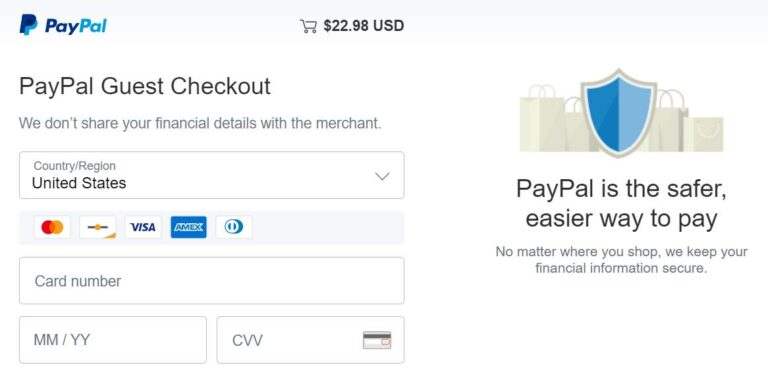
The recognizable logo could also help make customers feel more secure. Finally, you can opt to host the payment process on your site entirely. Additional fees apply for plans beyond the basic redirect to PayPal’s site.
Hosting plans may not be the first thing you consider when comparing Stripe vs PayPal, but it might still matter.
PayPal offers more options for hosting plans, although some come at a price. If you want to host your checkout page, you probably won’t mind Stripe’s limitations.
10. Is PayPal’s support better than Stripe’s?
Both payment processors have a robust support system. Choosing which support team is better comes down to how well suited you are for the platform overall.
For example, someone without much development experience will likely struggle with Stripe’s support team more than PayPal’s. However, if you’re constantly contacting PayPal’s support team about customizing your gateway, you’ll probably end up frustrated by their responses about the limitations.
Conclusion
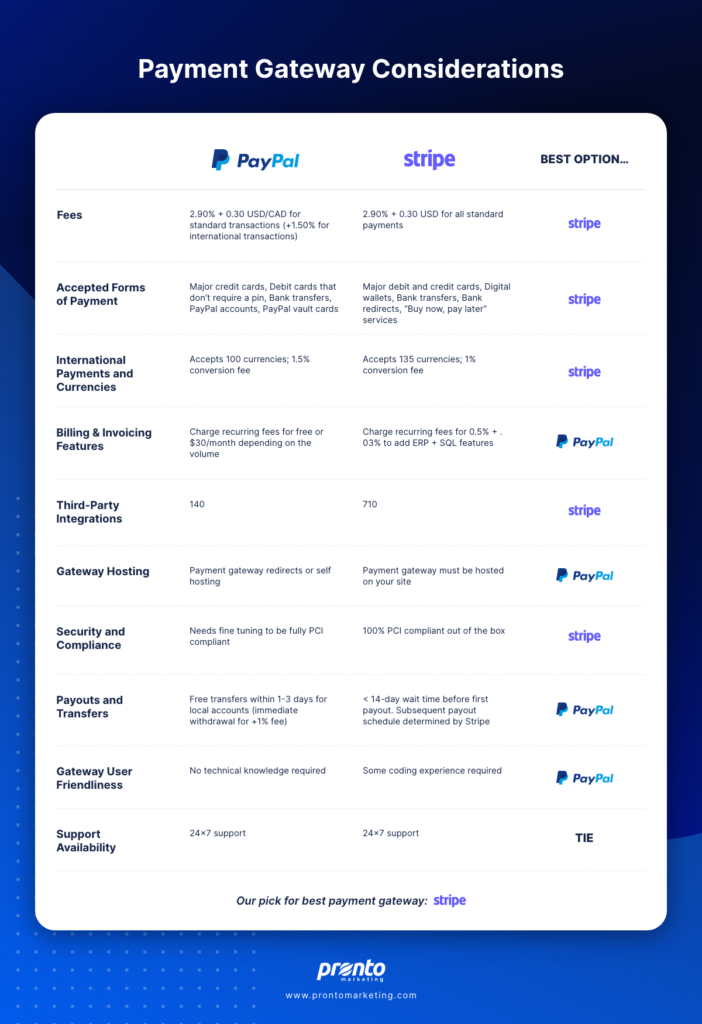
Stripe and PayPal are two high-quality, popular options for processing customer payments.
At Pronto, we recommend Stripe’s payment gateway. But that isn’t the be all end all answer. There are plenty of times when PayPal makes more sense for a specific project. And when it does, we are fully trained and equipped to set it up for you.
If you have any questions about which payment processor is the right fit for your business, we’d be happy to offer you a free website consultation!