
To show up in Google AI Overviews and AI Mode, your page needs to be indexed and eligible to show a snippet in Google Search. Google says there’s nothing extra to add for AI. That makes you eligible, but it doesn’t guarantee a citation. Your best chance is a page that clearly answers the buyer’s question, with proof. In practice, that comes down to four steps:
- make sure Google can crawl and index your key pages, and don’t block snippets
- answer the questions behind each search, and back up your answers with proof
- find out which of your buyers’ searches show AI answers
- check AI Overviews and AI Mode separately, because they often cite different pages
AI Overviews appear within some regular Google search results. AI Mode is a separate search experience you open to ask questions and follow-ups.
What Does Google Say It Takes to Show Up in AI Overviews and AI Mode?
According to Google, nothing beyond normal SEO. Google’s documentation says a page must be indexed and eligible to show a snippet in Google Search. It lists no extra requirements or special optimizations for AI Overviews or AI Mode.
Google’s guide to generative AI search goes a step further. It lists five things you can ignore for Google Search: llms.txt files and special AI markup, chunking content, rewriting content for AI, seeking inauthentic mentions, and overfocusing on structured data. Structured data still matters for rich results, but you don’t need special markup for AI.
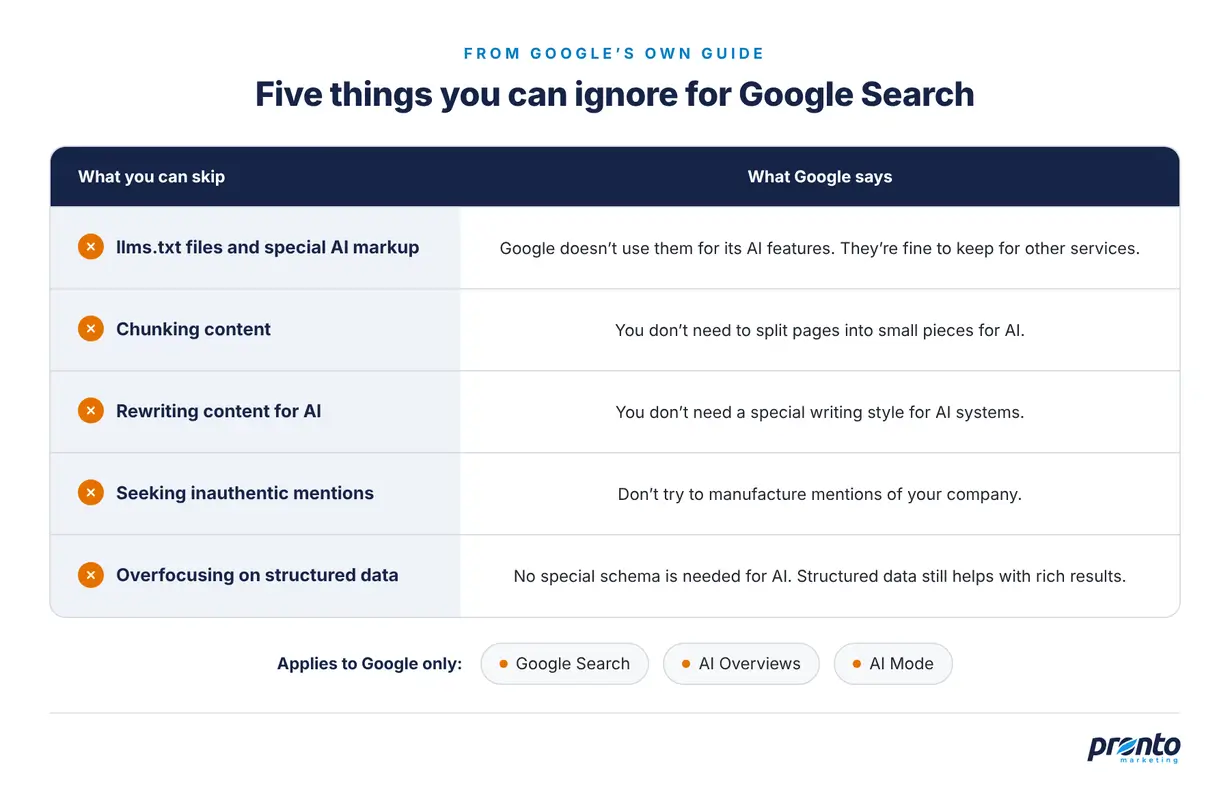
Five things Google says you can ignore for Google Search. Source: Google.
Note the qualifier, though. Google lists these as things you can ignore “for Google Search.” Take llms.txt: Google says the file won’t help you in Google Search, but it’s fine to keep one for other services that use it. Google can tell you what its own AI features need, but not what ChatGPT or Claude need. If those matter to your buyers too, see our post on getting your company recommended by ChatGPT.
Don’t expect much from llms.txt elsewhere yet, either. In Ahrefs’ study of 137,000 sites, 97% of llms.txt files got no requests at all in May 2026, from AI bots or anyone else.
We walk through Google’s list, and where we’d be careful with it, in our video, Google Says You Can Ignore These AI SEO Tactics. Should You?
What Makes Google Cite Our Page in an AI Answer?
Mostly the same things that help it rank. Google says both features may use “query fan-out,” running several related searches across subtopics to build one answer. So a page can be cited for answering one part of the buyer’s question well. Start with these four checks.
- Can Google crawl, index, and quote the page?
Ask your developer to check robots.txt and any CDN or firewall rules that could block Googlebot. Then make sure the page doesn’t use noindex, nosnippet, or a very low max-snippet value. A page that can’t show a snippet isn’t eligible to be cited. In Search Console, also check the new Search generative AI control. It should be set to Include, or inherit Include from a parent property.
- Does the page answer the questions behind the search?
One search often hides several smaller questions. In our video AI Search Doesn’t Pick the Best Brand, we used this example: “Who can help my HVAC company get more calls from Google?” That buyer also wants to know whether SEO, Google Ads, or local SEO fits, whether the agency knows home services, and what proof it has. Your page should answer the smaller questions behind the search, not just the main one. Google says you don’t need to split the page into small chunks for AI, either.
- Does the page show proof?
A vague page is weak everywhere. In our Google video, we used the example of an MSP whose managed IT services page says the same thing as 500 other MSP sites, with no examples or case studies. That page is weak in Google and in ChatGPT. Add case studies, specific examples, reviews, and details about who you serve. Our video on the new service page formula shows what a strong service page needs to make clear.
- Is your Google Business Profile up to date?
For local businesses, the Business Profile matters too. Google’s guidance tells businesses to keep their Business Profile information up to date, and the profile also feeds the map pack. Check your categories, services, hours, and reviews. In our accounting test below, every source AI Mode cited was a Business Profile.
Which Searches Show AI Overviews, and How Is AI Mode Different?
AI Overviews appear on selected searches, including many commercial searches where buyers compare providers, check prices, or read reviews. Plain “service + city” searches still tend to show the map pack first. AI Mode lets you ask questions directly, but it may return web links when it can’t confidently provide an AI response.
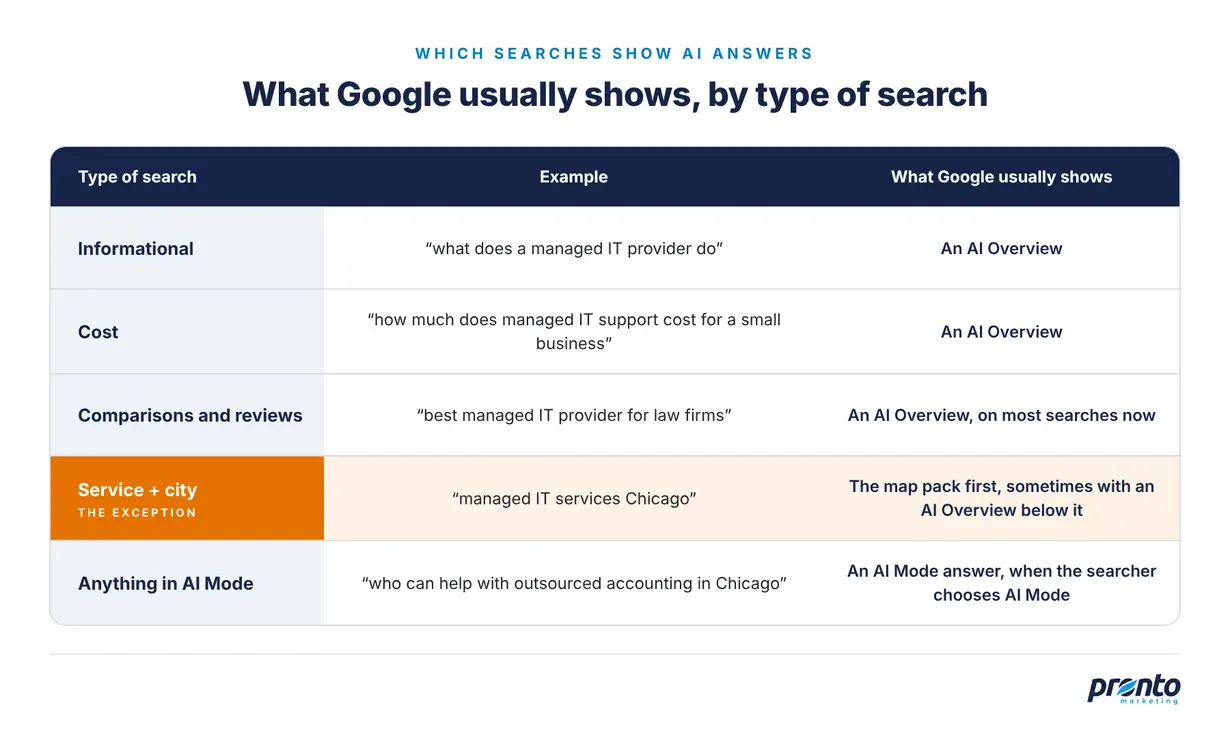
What Google usually shows for each type of search. Sources: Semrush, Whitespark, and our own searches.
The change has been fast. A Semrush study tracked the same 400 commercial keywords on US desktop for a year. The share that showed an AI Overview went from 46% to 88% by August 2026, and it reached 96% for “best X for Y” searches.
Cost questions are a good example. We searched “how much does managed IT support cost for a small business” three times in October 2026, signed out of Google, with Google’s location set to Chicago. Each time, Google showed an AI Overview, and each one gave the same range: $100 to $250 per user, per month.
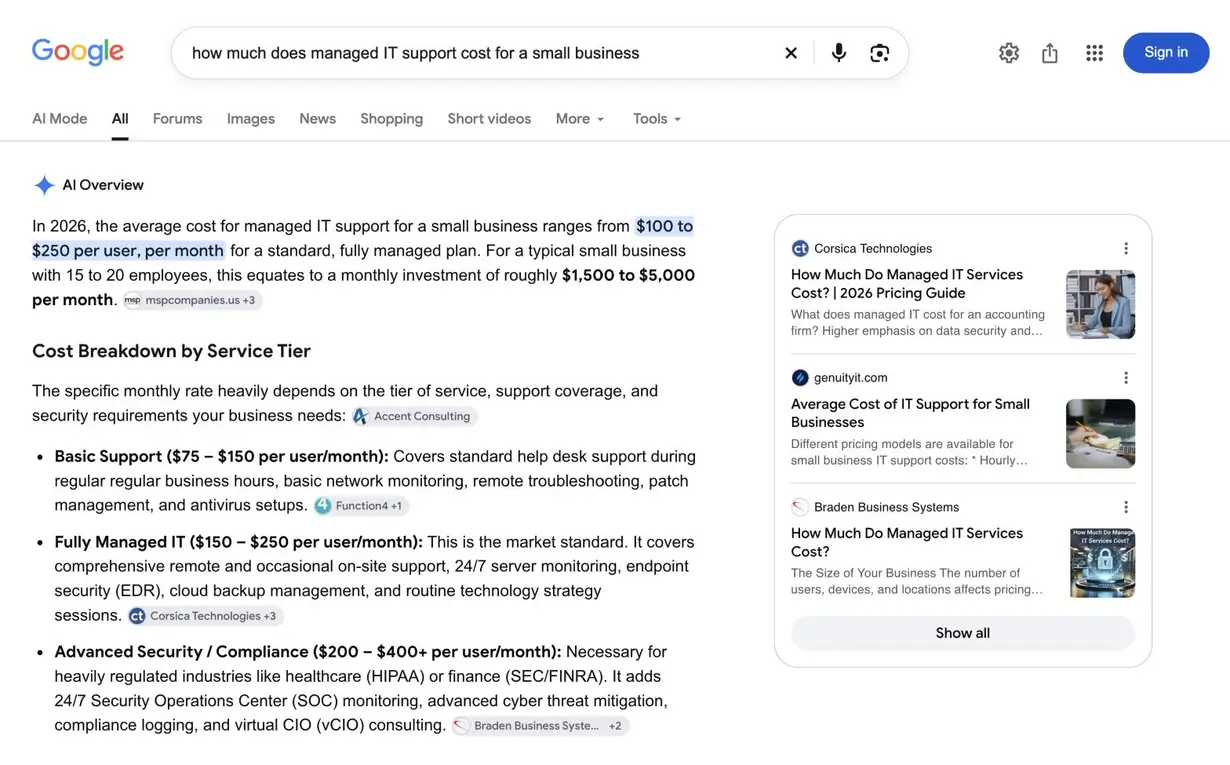
Google’s AI Overview for “how much does managed IT support cost for a small business” in October 2026.
Local searches are more mixed. In a 2025 study by local SEO company Whitespark, AI Overviews showed on 92% of local informational searches and 97% of searches that mixed a question with a location, but on only 15% of plain “service + city” searches. The map pack showed on 93% of those.
In our searches, the map pack still came first. For “managed IT services Chicago,” it topped the results in all three runs, and an AI Overview appeared below it in two. When an AI Overview appeared, it named the same three businesses as the map pack. In the other run, Google said it couldn’t generate one.
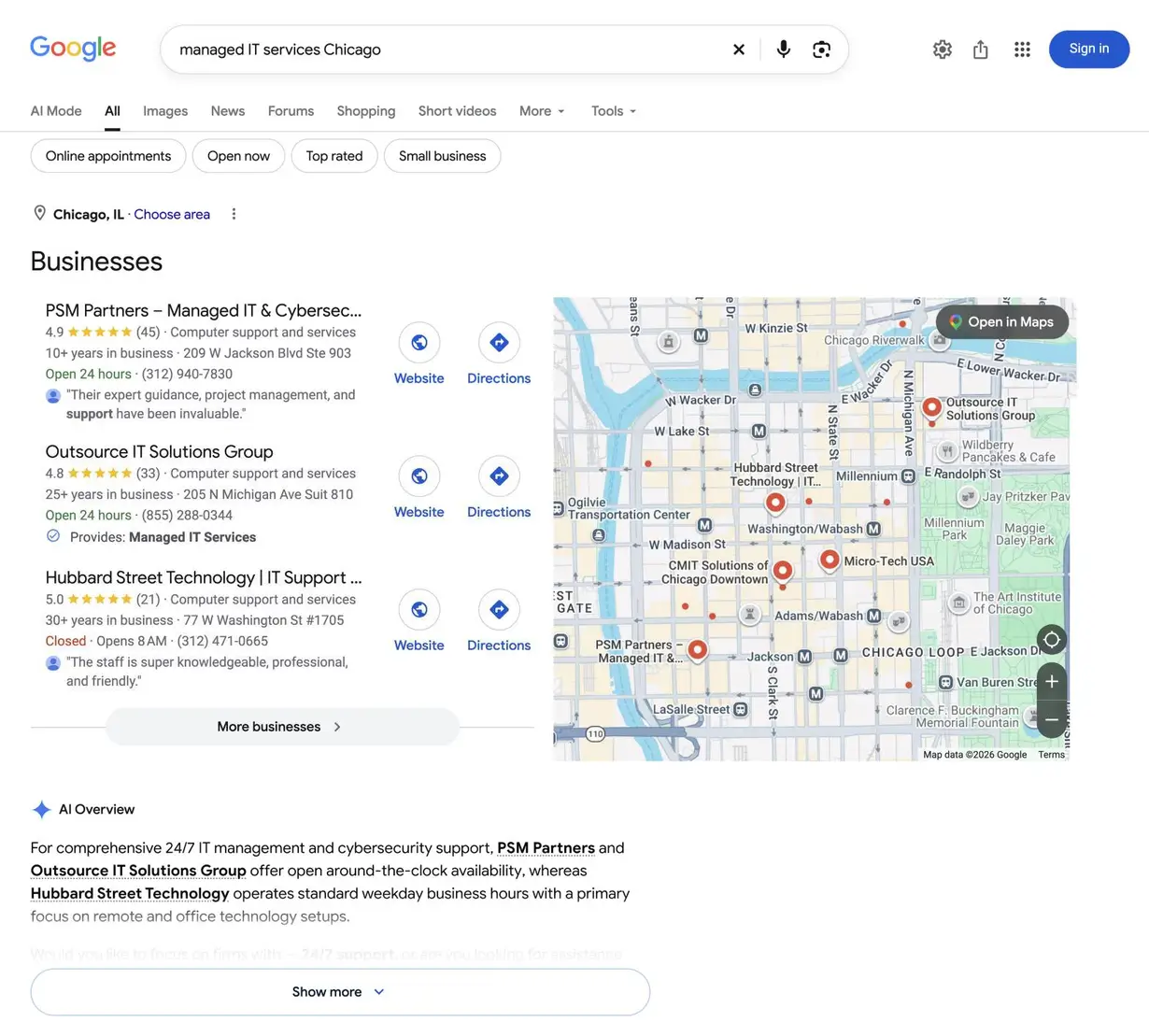
Google’s results for “managed IT services Chicago” in October 2026, with the AI Overview below the map pack.
To see which of your own keywords show AI answers, search your buyers’ questions, or filter your keywords by the AI Overview SERP feature in Ahrefs or Semrush.
Do AI Overviews and AI Mode Cite the Same Pages?
Not necessarily. An Ahrefs study found 13.7% overlap between the URLs cited by AI Overviews and AI Mode in its September 2025 US sample, even though their answers were usually very similar. Being cited in one doesn’t mean you’ll be cited in the other.
Google says the two features may use different models and techniques, so their answers and links will vary. Ahrefs also found that AI Mode’s answers are about four times longer and mention more people and brands.
We tested this with the accounting example from our Google video. We searched “who can help with outsourced accounting in Chicago” three times in each feature, signed out, with Google’s location set to Chicago. Across all six runs, AI Overviews and AI Mode didn’t cite a single source in common. They didn’t recommend any of the same firms, either.
The sources were different kinds of pages, too. AI Overviews cited firms’ own outsourced accounting pages, plus two directories, ClearlyRated and Thumbtack. AI Mode cited only Google Business Profiles.
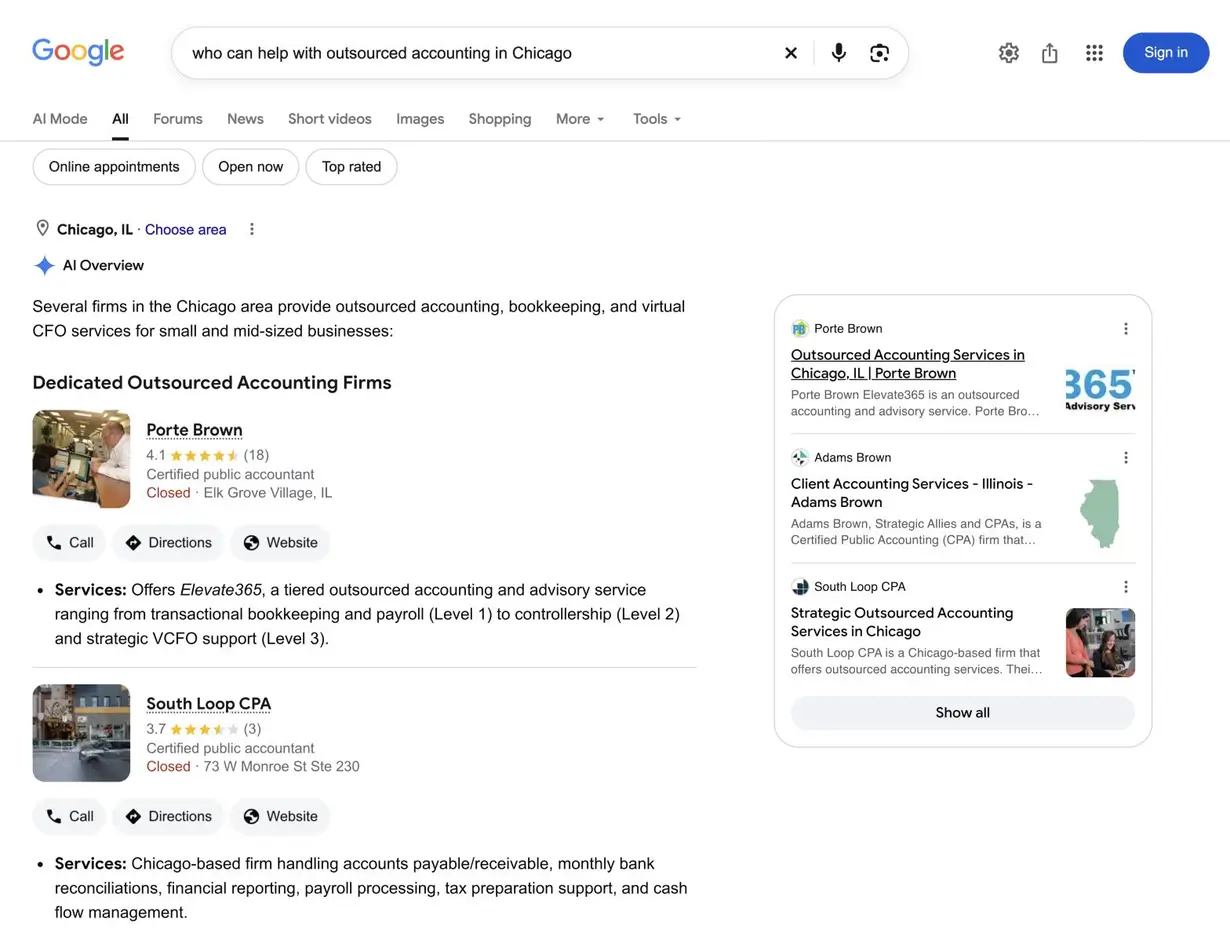
Google’s AI Overview for “who can help with outsourced accounting in Chicago” in October 2026.
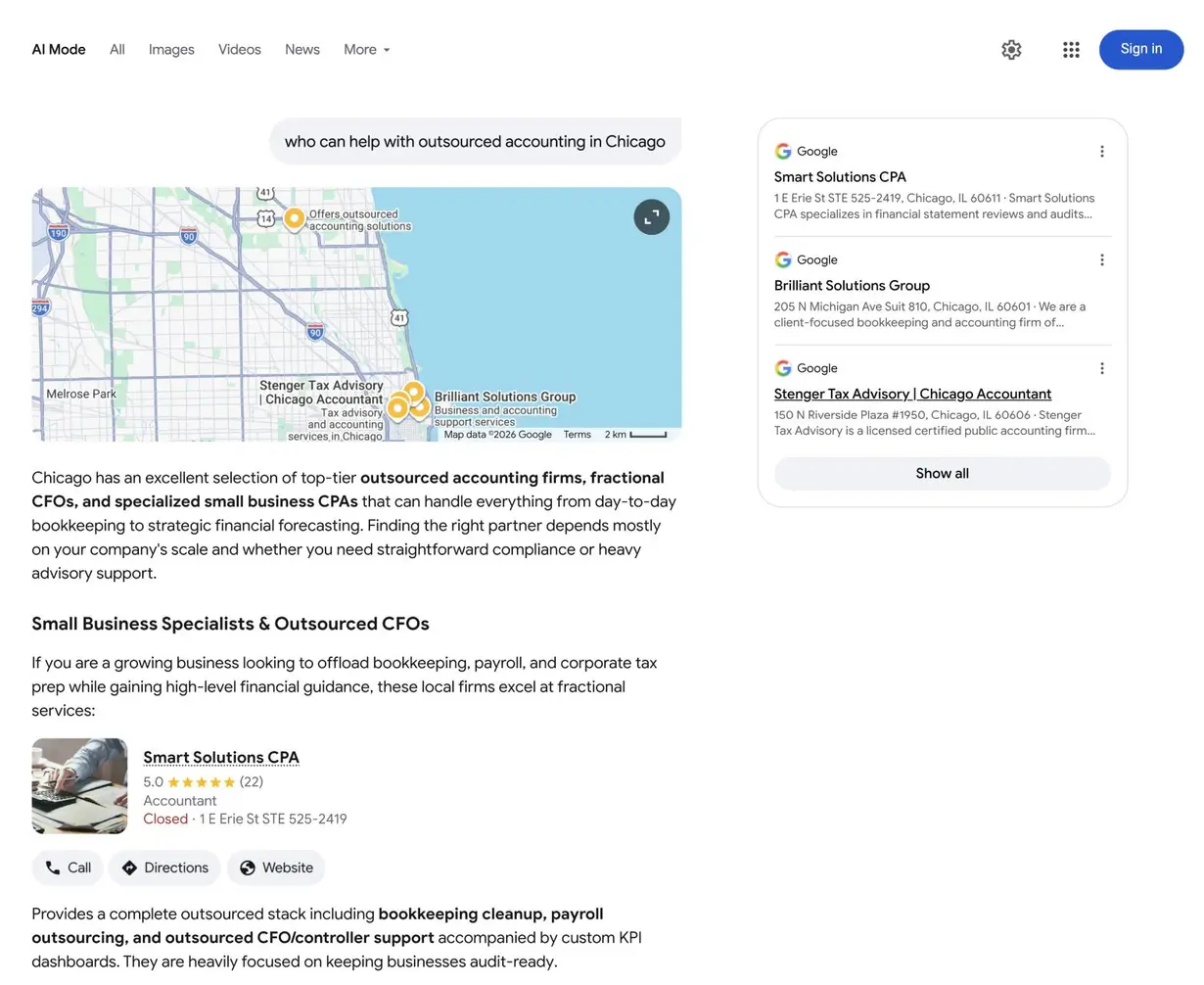
Google AI Mode’s answer to “who can help with outsourced accounting in Chicago” in October 2026.
One search isn’t a study, but the result fits the Ahrefs data. If you sell to local buyers, your service pages may earn citations in AI Overviews, while your Business Profile may matter more in AI Mode. So check both, and don’t assume a citation in one carries over to the other.
How do I get my company to show up when I serve multiple service areas, cities or states?
Give each real office its own Business Profile and its own page on your site. For places you serve without an office, let your website do the work, with a strong page for each city or state that matters. Just don’t create profiles or near-identical city pages for places where you don’t operate.
Business Profiles are tied to real locations. Google’s Business Profile guidelines allow one profile per location, and a virtual office doesn’t count unless it’s staffed during business hours. If you travel to customers, you can also list up to 20 service areas on your profile. But Google’s local ranking guidance lists distance from the person searching as one of the main factors in local results. One office won’t win the map pack in every city you serve. And as our accounting test showed, AI Mode leans on Business Profiles too.
AI Overviews were less tied to location. In all three runs of that test, they cited an accounting firm’s Illinois service page, even though all of the firm’s offices are in Kansas, Arkansas, and Oklahoma. A strong page for a city or state you serve can earn an AI Overview citation even where you don’t have an office. Our video Why Your Fully Optimized Google Business Profile Still Doesn’t Rank shows how to write pages that read like the neighborhoods you serve.
There’s a limit, though. Google’s spam policies list “pages targeted at specific regions or cities that funnel users to one page” as doorway abuse. Each city page should earn its place with real local detail, such as the clients you serve there, local case studies, and who does the work.
How Can We Check Whether Google Cites Our Pages?
Start with Search Console, then check the answers yourself. Search Console’s new Generative AI performance report shows which of your pages got impressions in AI Overviews and AI Mode, but not for which searches. To see which sources Google cites, search your buyers’ questions in both features.
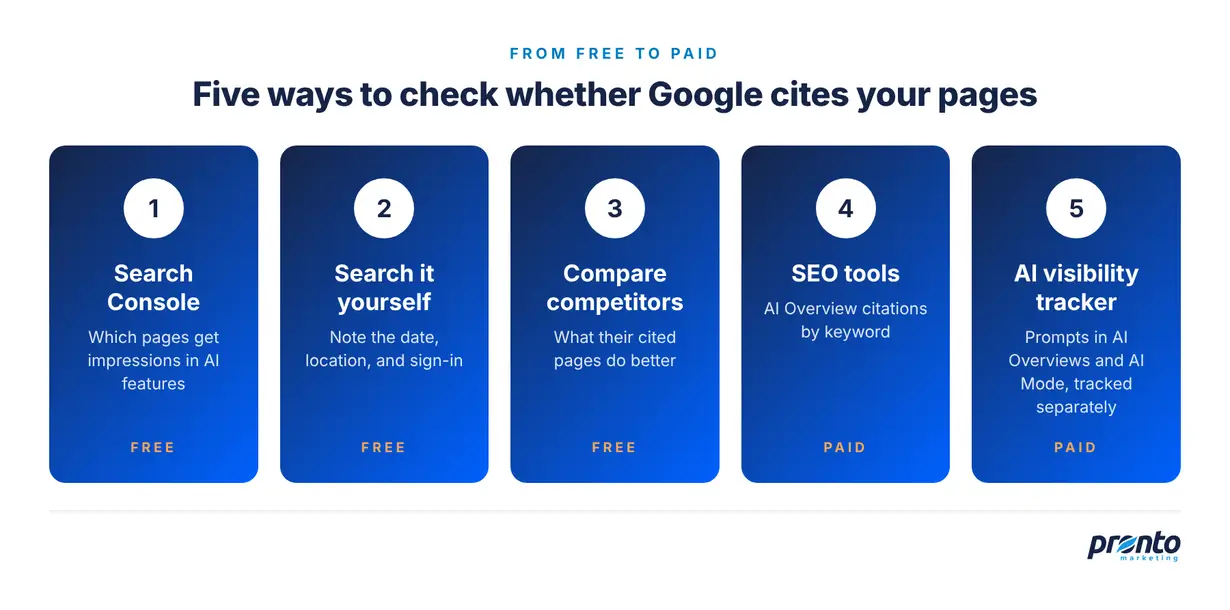
Five ways to check whether Google cites your pages, from free to paid.
The Generative AI performance report reached all sites at the end of August 2026. It shows impressions by page, country, date, and device, with no click or query data. Clicks from AI features are included in the regular Performance report, under the “Web” search type. If your site gets few impressions in Google’s AI features, you may not see the report at all.
When you search yourself, note the date, your location, and whether you were signed in, because the answers change. Repeat your key searches a few times before you draw conclusions. If competitors get cited instead of you, compare their pages with yours. Our post on why competitors show up in AI answers shows what to look for.
SEO tools like Ahrefs and Semrush can show which of your keywords cite your pages in AI Overviews, and recheck them over time. In October 2026, Ahrefs showed our own pages cited in AI Overviews for 179 US keywords, mostly service searches like “wordpress maintenance services.”
For an AI search optimization campaign, you’ll want more than spot checks. Peec AI, an AI search visibility tracker, follows your buyers’ prompts in AI Overviews and AI Mode separately. It shows your visibility, your competitors, and the sources each answer cites. It’s the tool we use in our AI search optimization service.
The Bottom Line on Showing Up in Google AI Overviews and AI Mode
You don’t need a separate AI SEO strategy for Google’s AI features. Google says they need nothing beyond the SEO that already helps you in regular search. Make sure your pages are indexed and can show a snippet, and that each one clearly answers the buyer’s question with proof. Then check AI Overviews and AI Mode separately, because they often cite different pages. For the other AI tools your buyers use, see our guide on how to show up in AI search results.
Want to know where your company shows up in Google’s AI answers, and who gets cited instead? Our AI search optimization services start with an audit of where you stand today.