
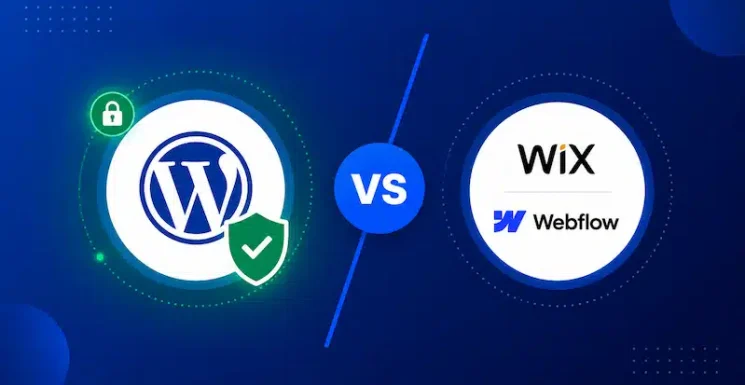
The Short Answer: Closed Builders Are Safer Out of the Box, but Not Inherently More Secure
Closed website builders like Wix, Webflow, and Squarespace are often more secure out of the box because the provider manages the hosting infrastructure, software updates, and core platform security for you. This reduces the number of security tasks a small business needs to handle directly and lowers the risk of problems caused by missed updates or poor configuration.
However, that does not mean WordPress is inherently less secure. A professionally managed WordPress website can be just as secure when updates, vulnerability monitoring, backups, patching, and recovery are handled properly. WordPress also gives businesses more control over their security setup, including how vulnerabilities are monitored, how quickly issues are patched, and how backups and recovery are managed.
In practice, security depends less on whether a platform is open or closed and more on how well the website is maintained.
Why Wix, Webflow, and Squarespace can be safer out of the box
Closed website builders such as Wix, Webflow, and Squarespace have a genuine security advantage for many small businesses: they reduce the number of security decisions the website owner needs to make.
Because these platforms operate as managed SaaS services, the provider is responsible for much of the underlying infrastructure, core software updates, platform-level patching, and security maintenance. For a small business running a relatively simple website without in-house technical expertise or a dedicated website management partner, that can significantly reduce the risk of security issues caused by outdated software, missed patches, or poor server configuration.
By comparison, an unmanaged WordPress site places more responsibility on the website owner to keep WordPress core, plugins, themes, hosting, backups, and security settings properly maintained.
That does not mean closed platforms are inherently secure or immune to attack. They still rely on third-party software, integrations, APIs, and software supply chains that can introduce vulnerabilities. The difference is mainly who is responsible for managing the risk, rather than whether the risk exists at all.
Why that doesn’t mean WordPress is inherently less secure
In our previous article, Can AI Manage Your WordPress Site Unsupervised?, we reviewed the dangerous blind spots of handing website management over to autonomous algorithms. But in almost every conversation about website security, management, and platform choice, a recurring objection always bubbles up:
“Isn’t WordPress inherently insecure? Shouldn’t we switch to a closed platform like Webflow, Squarespace, or Wix to be safe?”
It is easy to see where this perception comes from. Open-source ecosystems are completely public. Databases like Patchstack maintain a daily, public log of every vulnerability discovered across thousands of WordPress plugins and themes. Furthermore, plugin supply chain attacks, such as threat actors buying established WordPress plugins solely to quietly inject backdoor code into legitimate updates, frequently make industry headlines.
When business leaders see these public reports, their immediate instinct is often to seek shelter in a “walled garden.”
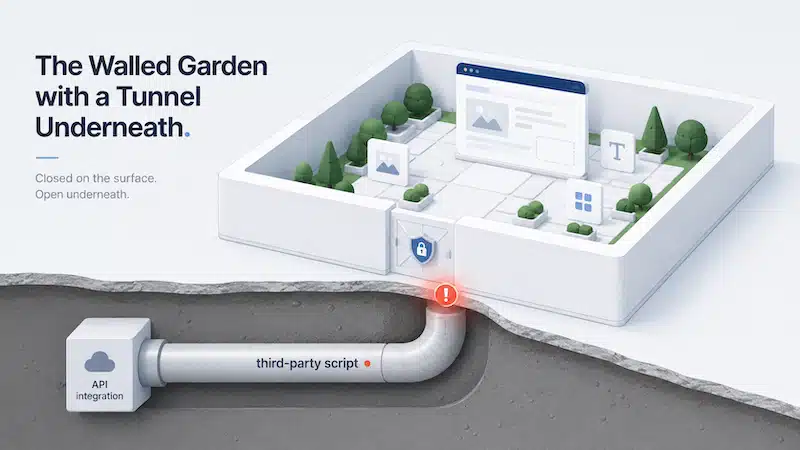
However, this instinct rests on a dangerous misconception: that closed platforms are inherently immune to cyber threats.
The reality of modern cybersecurity is far less simple and far more interconnected. The fact of the matter is: Nothing on the web is 100% secure. Choosing a website platform isn’t about finding an unhackable box; it’s about understanding your actual risk surface, recognizing that every modern technology stack shares foundational risks, and putting a proactive insurance policy in place.
Case Study: The keyv NPM Supply Chain Attack
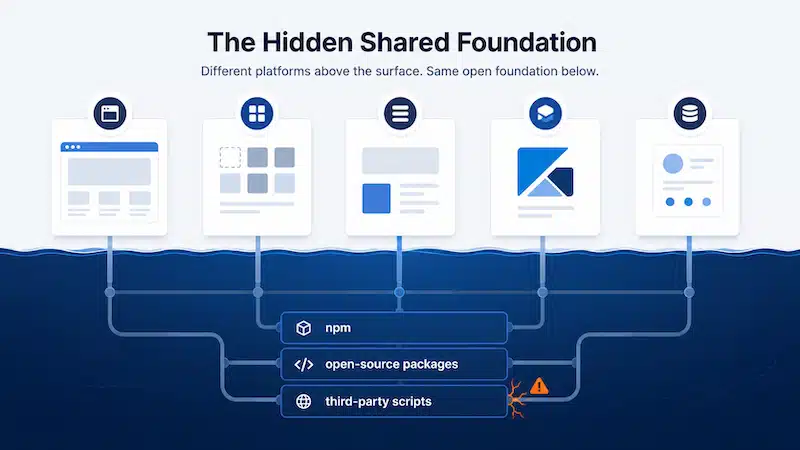
To understand why platform tribalism (“WordPress vs. Closed Builders”) misses the point, we have to look at how modern cybersecurity attacks actually work. Threats rarely target a platform’s front door; they target the invisible supply chain that powers the entire web.
In August 2026, cybersecurity firm Aikido Security disclosed a massive, fast-moving supply chain attack targeting the Node Package Manager (NPM) ecosystem, the fundamental JavaScript package infrastructure used by developers, SaaS tools, and website builders worldwide.
What Happened in the Attack?
- Maintainer Account Compromise: Attackers compromised the GitHub account of the primary maintainer behind keyv (a key-value storage library with over 127 million weekly downloads) and several companion caching packages like flat-cache and file-entry-cache.
- Poisoning the Source with Valid Provenance: The attackers pushed malicious code directly into the source repositories and triggered automated release builds via GitHub Actions. Because the malicious versions passed through official build pipelines, they were published with valid digital provenance. Traditional signature-checking tools didn’t flag them because they appeared completely legitimate.
- The “Shai-Hulud” Worm Payload: Upon execution (even during standard npm install processes), the hidden payload harvested sensitive credentials—including AWS keys, GitHub tokens, Kubernetes secrets, npm publishing tokens, and environment variable files (.env).
- Autonomous Self-Propagation: The malware didn’t stop at stealing data. Using stolen npm publishing tokens, the worm automatically republished itself into hundreds of other packages maintained by victims, expanding to over 800 compromised packages accounting for more than 2 billion monthly downloads within days.
Why This Matters for Website Security
Whether a developer is building a custom integration for a WordPress site, designing a web app, or maintaining the infrastructure of a closed SaaS builder like Webflow or Wix, they rely on the exact same underlying JavaScript and Node.js supply chains.
A vulnerability in an NPM package doesn’t ask what CMS you use. If a closed builder’s engineering environment or a third-party script integration uses a compromised package, your data and site assets are exposed. Open-source transparency makes vulnerabilities visible; closed ecosystems often just hide the exact same risks behind a curtain.
The Illusion of the Walled Garden: Website Customization and Hidden Risks
Proprietary builders market themselves on peace of mind. By locking down hosting, core code, and user permissions, platforms like Webflow, Wix, or Squarespace promise to shield you from security headaches.
If your website is a 3-page static brochure that uses zero custom code, zero third-party integrations, and standard out-of-the-box blocks, that sandboxed environment can reduce certain basic attack vectors.
However, modern business websites are almost never static brochures.
The Customization Boundary
As soon as a business needs more functionality such as custom CRM integrations, interactive calculators, custom API webhooks, dynamic layouts, or custom JavaScript tracking, you step outside the closed builder’s protected sandbox:
- Third-Party Script Exposure: Custom integrations require loading external scripts. If those external services or their software supply chains are compromised, your closed-builder site becomes vulnerable to script injection, data scraping, and session hijacking.
- Breakage and Technical Debt: Closed platforms regularly update their core rendering engines and styling frameworks. When you’ve heavily customized a theme or layout outside their standard parameters, core platform updates can silent-break layouts, break form submissions, or destroy responsive design logic without warning.
- Vendor Lock-In and Opaque Security: When a vulnerability occurs within a proprietary builder’s internal stack, you are entirely reliant on their internal team to detect and patch it. There is no public vulnerability database, no community auditing, and no option to apply your own fix or security layer.
The WordPress Advantage: Visibility and Security Through Transparency
If both open-source and closed platforms face security risks, why does WordPress continue to power over 40% of the web?
The answer lies in transparency, community scrutiny, and granular control.
Public Vulnerabilities vs. Hidden Vulnerabilities
The frequent listing of WordPress plugin vulnerabilities on databases like Patchstack is often interpreted as a weakness. In reality, it is a sign of an active, vigilant security ecosystem.
- Rapid Discovery: Millions of developers and security researchers audit WordPress core and popular plugins daily. Vulnerabilities are caught, assigned CVE numbers, and patched publicly—frequently before they are ever exploited in the wild.
- Granular Patch Control: In WordPress, site administrators have total control to update, patch, virtual-patch via Web Application Firewalls (WAF), or temporarily replace a vulnerable plugin within minutes of a disclosure.
- Decoupled Architecture: On a properly configured WordPress stack, security layers (firewalls, host-level isolation, database permissions, object caching) operate independently. An issue in one plugin does not automatically mean a compromise of the underlying hosting server.
What Is Your Web Security Insurance Policy?
Since no platform, framework, or AI management tool can guarantee 100% immunity from cyber threats, the central question for business owners should be:
“What proactive safeguards and insurance policies do we have in place when a threat inevitably emerges?”
Relying on false hopes or unsupervised automated updates is a gamble. A robust web security posture requires a layered, proactive management framework.
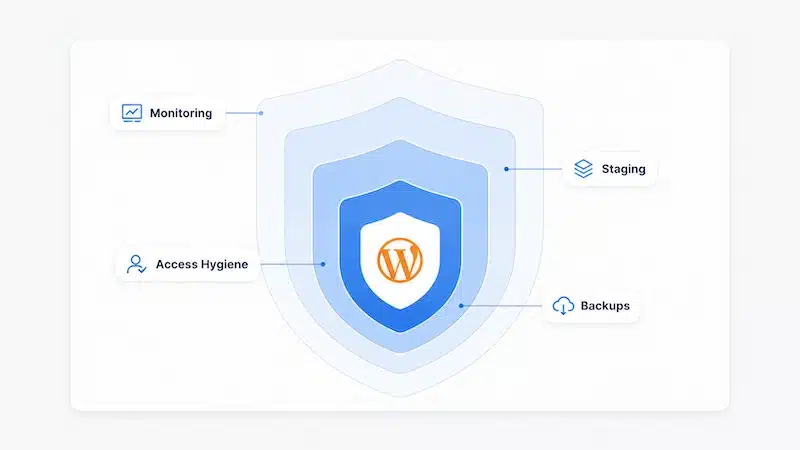
What a proactive web security framework looks like:
1. Real-time threat monitoring & vulnerability auditing
Continuous monitoring (Patchstack, WAF) to catch zero-days.
2. Human-in-the-loop staging & testing
Updates verified on staging before production deployment
3. Least privilege & environment hardening
Daily off-site backups with rapid point-in-time restore options.
4. Isolated, immutable backups (the ultimate failsafe)
Strict admin access, 2FA, API key hygiene, disabled execution.
Key Pillars of a Modern Site Insurance Policy
- Active Vulnerability Monitoring & Rapid Patching
Security isn’t set-and-forget. It requires real-time intelligence feeds (like Patchstack) to flag vulnerable plugins instantly, combined with managed Web Application Firewalls (WAF) to block exploit attempts before patches are even applied. - Human-in-the-Loop Staging Environments
Automated updates—whether driven by platform auto-updates or unsupervised AI agents—frequently break complex sites. Every update, patch, or code modification should be deployed and tested in an isolated staging environment first by experienced web engineers. - Strict Credential and Access Hygiene
As demonstrated by the keyv attack, stolen credentials and tokens are the primary vehicle for supply chain propagation. Enforcing Multi-Factor Authentication (MFA), enforcing least-privilege administrative roles, and auditing API tokens regularly is mandatory. - Off-Site, Immutable Backups (The Failsafe)
Your ultimate security net is your backup system. If a zero-day vulnerability, supply chain worm, or rogue script impacts your site, an off-site, uncompromised, point-in-time backup ensures your site can be fully restored in minutes with zero data loss.
Recommended articles to learn more:
- 16 essential WordPress security updates to protect your website.
- How can I build and maintain a resilient WordPress website? 5 tips to withstand disasters.
- Case Study: Neutralizing a fake reCAPTCHA malware attack in 40 minutes
- Case Study: Overcoming server instability from an aggressive cyber attack
Conclusion: Stop Chasing Unhackable Platforms and Start Managing Risk
Is WordPress insecure? No more than the rest of the modern web.
The idea that moving to a closed builder eliminates risk is an illusion that crumbles the moment you customize your site or rely on third-party software supply chains.
In a digital landscape shaped by supply chain worms, automated exploit bots, and rapid code deployment, security is a process, not a product. WordPress remains the most flexible, powerful, and scalable content management system available, provided it is backed by proactive maintenance, continuous monitoring, and expert human oversight.
Is Your WordPress Site Fully Protected?
Don’t wait for a security notification to find out if your site is vulnerable. Contact Pronto Marketing today to learn how our dedicated WordPress management, proactive security patching, and complete backup protection keep your business safe 24/7.
You can see real-world examples of how we manage these technical pillars in our website support projects.